 Reel Sorter
Find the reels that actually went viral.
Reel Sorter ranks any Instagram, TikTok or Facebook profile by views, likes, comments or outlier score. Download the winners in bulk, scan the comments for buying intent and work out revenue per million views.
Watch it find viral reels on autopilot.
Noel sorts a profile, spots the outliers and pulls the winners, start to finish.

Four platforms. One extension.
Everything a research session needs, on the page you are already on.
No dashboards and no second tool. The sorted grid replaces the normal feed and every action sits on one bar.
Sort by what matters
Views, likes, comments, shares, outlier score or oldest first. The latest 25, 100, 1,000 or all posts, or a date range down to the day.
Bulk download
Every sorted reel as one ZIP, or only the ones you select. Carousels come as numbered files, videos as MP4.
Export and copy
Excel, CSV or JSON with link, date, views, likes, comments, caption and outlier score. Or paste the table straight into Sheets.
Filters that stay put
Narrow by view or like range, posting date or type. Re-sort from the bar without reloading.
Outlier detection
Every reel is measured against the account's own median. A 10× badge means ten times the usual views.
cvr/mil calculator
Turn one test order into revenue per million views. The views fill in from your last sort.
CTA comment scanPRO
Type the words viewers are told to comment. See how many comments contain them and how that compares to views and likes.
Live stats barPRO
While you scroll reels, a bar next to the video shows views, views per hour and likes and comments per 100.
Hover downloads
A download button on every tile, also on normal unsorted profiles and single reel pages.
One bar. Every action.
After a sort, this bar sits on top of the grid: select, download, copy, export, filter and re-sort. It follows Instagram's light or dark mode.

Real screenshot: 25 reels of @nasa sorted by views.
Views are relative. Outliers are not.
400,000 views mean nothing on a 100-million-follower account and everything on a page that usually gets 20,000. Reel Sorter measures each reel against the account's own median, so a breakout is a breakout at any size.
top reel vs. median
earns a lightning badge
Views of @nasa's latest 25 reels, ranked. Median 3.9M, top reel 11.5M. Orange bars are 2× the median or more.
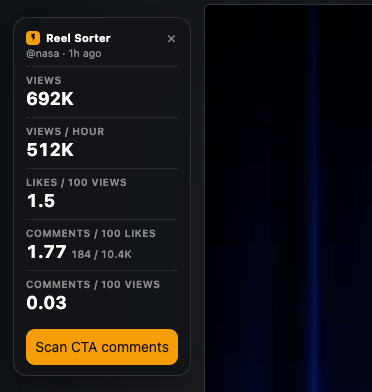
Real screenshot from an Instagram reel, one hour after posting.
The numbers Instagram hides, next to every reel.
Scroll Reels, TikTok or Shorts as usual. The bar shows views, views per hour, likes per 100 views, comments per 100 likes and comments per 100 views, with a button that opens the comment scan.
Revenue per million views, from one test order.
Place a test order in the competitor's shop and note the order number. Reel Sorter adds up the views it collected and turns that into revenue per million views, the fastest way to compare products.
Shopify order numbers start at #1001, so order #1100 means 100 orders. In the extension the views fill in after each sort, per platform. How the cvr/mil method works
For people who research content for a living.
Organic dropshippers
Find the reels that sell a product, measure demand in the comments and compare competitors by revenue per million views.
Creators and UGC makers
See which hooks and formats break out on any account and download references for your next shoot.
Social media managers
Audit a client's or competitor's profile in a minute and export the numbers for your report.
Coaches and agencies
Teach product research with a tool your students can install for free, and earn on every referral.
Sorting is free. Research tools are Pro.
Every install gets Pro free for 3 days, no card. After that, sorting, downloads, exports and the cvr/mil calculator stay free with no limits.
- Sort by views, likes, comments, outliers, date
- Unlimited bulk downloads and exports
- cvr/mil calculator
- Pro features for your first 3 days
- Everything in Free
- CTA comment scan, unlimited keywords
- Live stats bar on all four platforms
- All updates, priority email support
- Everything in Pro
- Fastest support
- One wishlist feature every month
- Early access to new features
Prices in US dollars; tax may be added at checkout. Payment, invoices and cancellation run through Whop. After your purchase you get a license key that you paste into the extension (gear icon). Cancel any time.
Rather not pay? Bring 8 friends.
Refer 8 paying users and Pro is yours for life. Everyone you refer also earns you 35% of every payment.
Before you install.
What is free and what is Pro?
Sorting, bulk downloads, exports and the cvr/mil calculator are free with no limits. The CTA comment scan and the live stats bar are Pro. Every install gets Pro for the first 3 days, no card needed.
How do I activate Pro or VIP?
Buy a plan through Whop, copy the license key from your Whop account and paste it into the extension under the gear icon. Reel Sorter never asks for your Instagram, TikTok, YouTube or Facebook login.
Can I get it without paying?
Yes. Refer 8 paying users and Pro is yours for life. See how the referral rewards work.
Where does my data go?
Sorting, downloads, exports, scans and the calculator run in your browser. With a paid plan the extension sends only your license key to our server to check that it is valid. Payments are handled by Whop.
Can I sort Instagram posts by views?
Instagram only exposes views for reels. Sort the Reels tab or the Explore page by views, and the Posts tab by likes or comments.
Can I cancel any time?
Yes. Cancel in your Whop account and the plan ends with the current billing period. The free features keep working.
Stop scrolling. Start ranking.
Free on the Chrome Web Store. Sorting and downloads have no limits.
★★★★★ 5.0 from 3 ratings on the Chrome Web Store
See how many people asked for the link.
"Comment SHOP and I'll send it" is the most common call to action on product reels. Type the keywords, separated by commas. Upper or lower case does not matter and the word can sit anywhere in the comment.
Scan of a real product reel
Scanned on 16 Nov 2026. Projected to all comments: about 13,300 people asked for the link.